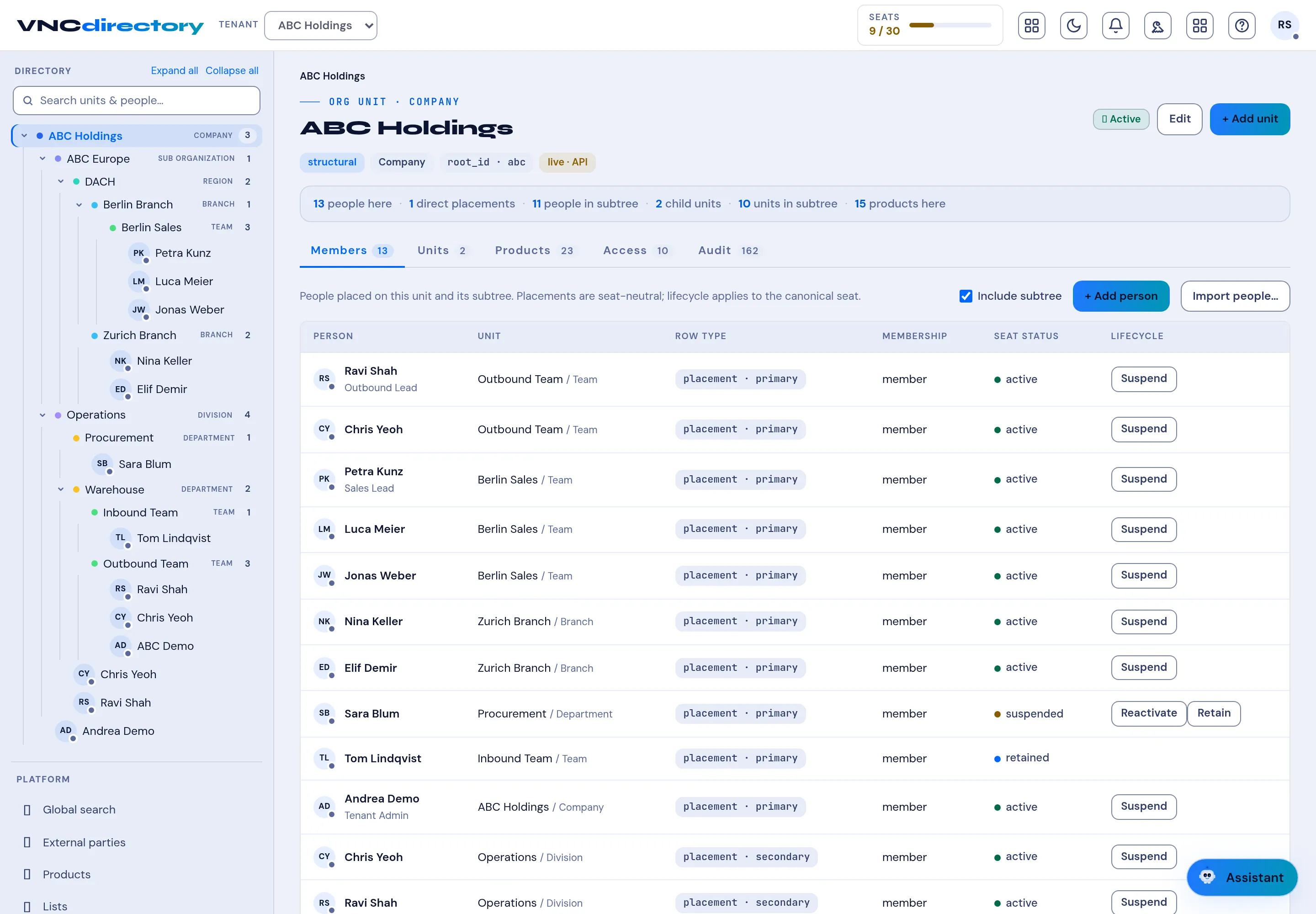
The unit view
Opening a unit — a company, region, branch, department or team — shows the same layout at every level.
Header
Section titled “Header”- Breadcrumb — the unit’s type and place (for example ORG UNIT · COMPANY).
- The unit name.
- Tags — structural, Company, the
root_id, and live · API when the unit is served to other apps. - Active state, Edit and Add unit.
Summary line
Section titled “Summary line”A count of what sits under the unit: people here, direct placements, people in subree, child units, units in subree and products here.
| Tab | Shows |
|---|---|
| Members | People placed on this unit and its subree. |
| Units | Child units. |
| Products | Products entitled here — see Manage products. |
| Access | Who can administer the unit. |
| Audit | The change history. |
Include subtree controls whether the tab counts only this unit or everything beneath it. Add person and Import people add members.
Member columns
Section titled “Member columns”| Column | Meaning |
|---|---|
| Person | Name and job title. |
| Unit | The unit the person is placed on. |
| Row type | placement · primary or secondary — a person has one primary seat per unit, plus secondaries. |
| Membership | member, guest, … |
| Seat status | active, suspended or retained. |
| Lifecycle | Suspend, Reactivate or Retain — see Units and entitlement. |