Model a workflow template
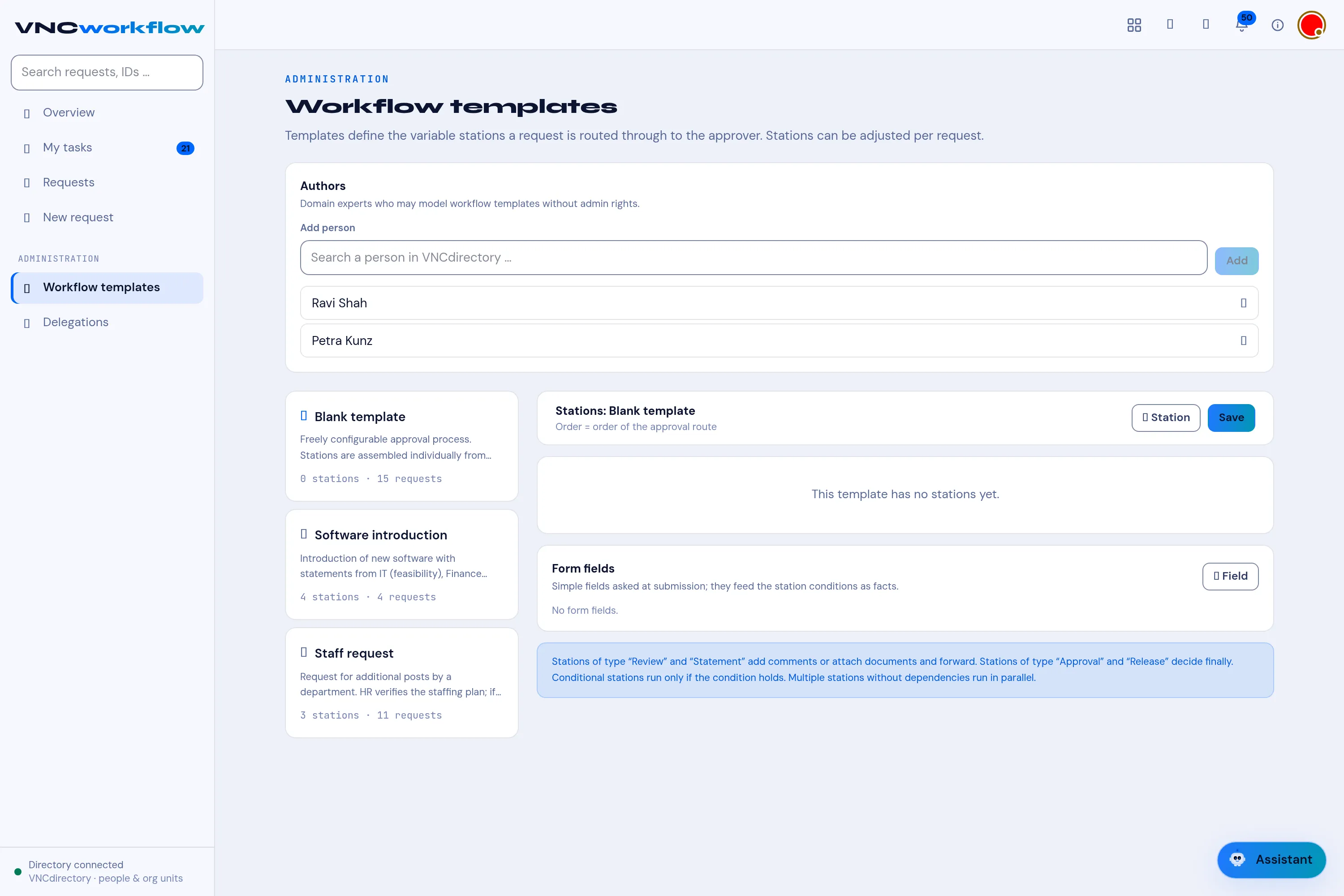
Under ADMINISTRATION → Workflow templates you model the approval routes requests follow. A template fixes the stations and their order; an individual request can still adjust them. This is the full guide to the editor.
Who can edit. Administrators, and any Author (see below) — domain experts who may model templates without full admin rights.
The layout
Section titled “The layout”- Authors — Add person to grant template-modelling rights.
- Templates (left) — each shows its name, a description and how many stations and requests it has.
- Editor (right) — Stations: (the approval route) and Form fields (the facts asked at submission).
Stations
Section titled “Stations”Order = order of the approval route. Add one with + Station; reorder (drag) to change the sequence. Each station has:
| Field | Meaning |
|---|---|
| Station type | Review / Statement / Approval / Release (below). |
| Organizational unit (optional) | The unit responsible — — any unit — for none. |
| Role | The role within the unit (e.g. member, unit lead). |
| Optional: bind to a single person | Pin the station to one person instead of a unit/role. |
| Task of this station | What the responsible person must do (e.g. Check the staffing plan). |
| Condition (optional) | Run the station only when a rule holds (below). |
| Parallel/waits for stations (optional) | Dependencies — after station n (below). |
Remove a station with Remove station.
The four station types
Section titled “The four station types”| Type | What it does |
|---|---|
| Review | The responsible person adds comments or attaches documents, then forwards. |
| Statement | Like Review — collects a statement (comment/attachment), forwards. |
| Approval | Decides finally at that step — approve / reject. |
| Release | Decides finally — releases the request onward. |
Stations of type Review/Statement add and forward; Approval/Release decide.
Conditions
Section titled “Conditions”A station can be conditional — it runs only when a rule over the request’s form fields holds. In Condition, set:
- Run when — always (no condition), all match (AND) or any matches (OR).
- The field, an operator — is, is not, is one of, is set — and the value (or a comma-separated list for is one of).
- + Condition to add another clause.
Example: Controlling runs only when Positions available is No. (This is why the request’s form fields matter — they are the facts a condition reads. If a template has no form fields, the editor says a condition has nothing to reference. A condition that is too complex to model safely stays unchanged.)
Dependencies (parallel vs sequential)
Section titled “Dependencies (parallel vs sequential)”By default stations run in sequence in their listed order. Use Parallel/waits for stations to make a station wait for another (after station n), so independent stations run in parallel and dependent ones wait.
Form fields
Section titled “Form fields”Form fields are simple questions asked at submission; they feed the station conditions. Add one with + Field:
| Column | Meaning |
|---|---|
| Key | The machine name a condition reads. |
| Label | What the submitter sees. |
| Type | Text, Number, Yes/No or Choice. |
| Options | For Choice — comma-separated. |
| Required | Whether the submitter must answer. |
A template with none reads No form fields / This workflow template needs no extra form fields.