The portal home page
The portal is the single door to the suite. You sign in once, and every product you are entitled to opens from here without a second login. It is also the first thing a new user sees, so this page explains it control by control.
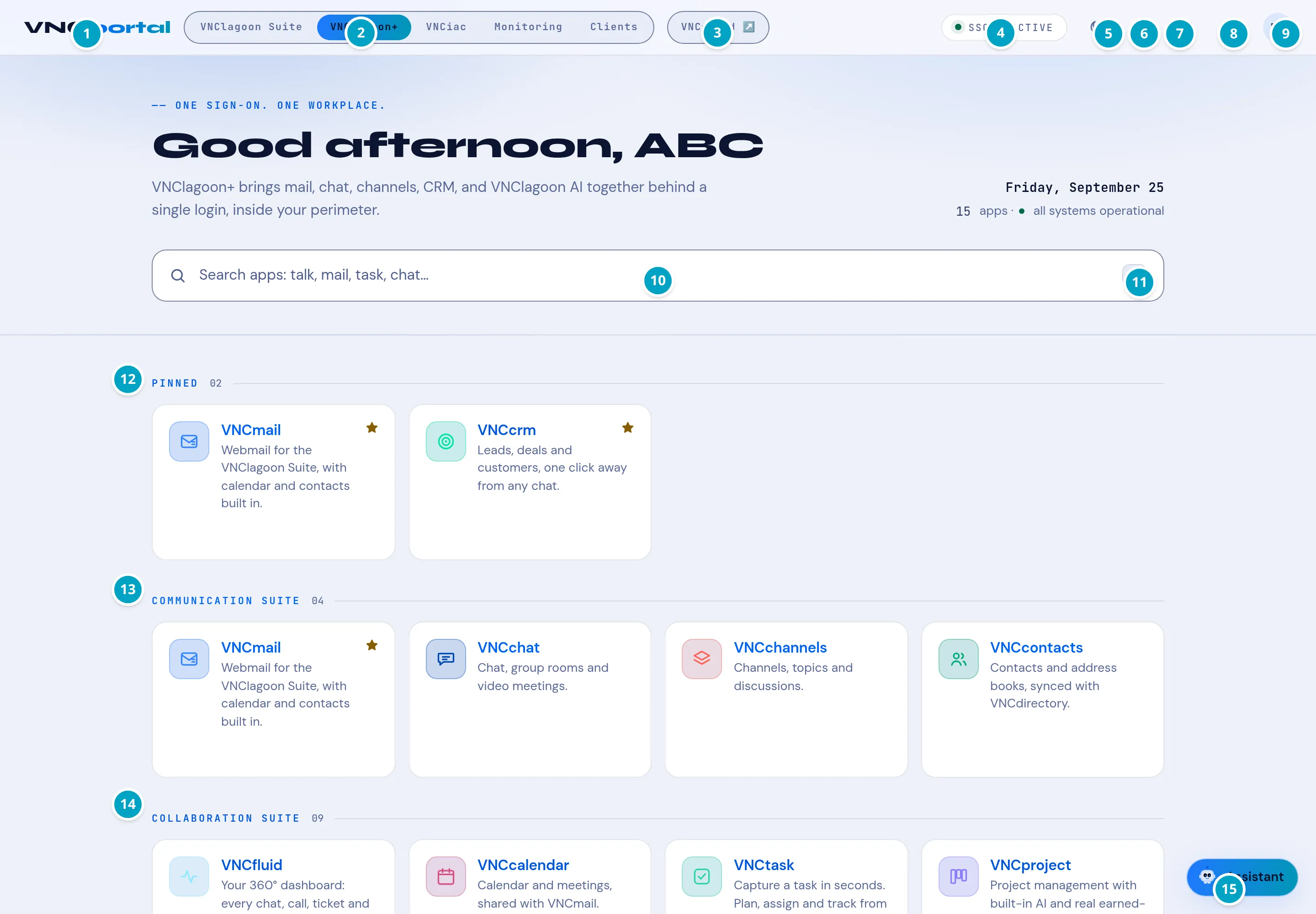
The greeting band
Section titled “The greeting band”- One sign-on, one workplace — the tagline, and the promise: one login for the whole suite.
- “Good afternoon, ABC” — greets your organization (your display name is resolved from VNCdirectory+).
- The subtitle lists what the suite covers — mail, chat, channels, CRM and AI — and reminds you it all runs inside your perimeter.
- On the right: today’s date and a live status line — 15 apps · all systems operational.
The top bar
Section titled “The top bar”| # | Control | What it does |
|---|---|---|
| 1 | VNCportal | The launcher home — click it from anywhere to return. |
| 2 | Space tabs | Switch spaces: VNClagoon Suite, VNClagoon+, VNCiac, Monitoring, Clients. A space is a curated set of apps for a job or an audience. |
| 3 | VNCfluid | One-click jump to the workspace shell (your personal dashboard). |
| 4 | SSO · ACTIVE | Your session is live and shared with every product. |
| 5 | Appearance | Theme family and light / dark mode — Appearance and themes. |
| 6 | Keyboard shortcuts | The shortcut reference for the current surface. |
| 7 | Notifications | Mentions, comments and replies across the suite. |
| 8 | Language | Your interface language, stored centrally in VNCdirectory+ — see Language. |
| 9 | Account | Your profile, settings and sign-out. |
Finding and opening apps
Section titled “Finding and opening apps”| # | Control | What it does |
|---|---|---|
| 10 | App search | Type an app name or a capability (“mail”, “task”, “chat”). |
| 11 | / |
Press / anywhere to focus the app search without the mouse. |
| 12 | PINNED | The apps you starred, kept at the top. Star or unstar on any tile. |
| 13 | COMMUNICATION SUITE | Communication apps — for example VNCmail, VNCchat, VNCchannels, VNCcontacts. |
| 14 | COLLABORATION SUITE | Collaboration apps — for example VNCfluid, VNCalendar, VNCtask, VNCproject. |
| 15 | Assistant | Lago, the in-product assistant — ask about the app you are in. |
Each tile shows the product name, a one-line description and a star. Select the tile to open the product; select the star to pin it.
- Which tiles you see is decided by your entitlement in VNCdirectory+, not by this page. An app you are not entitled to shows No access.
- The suite is the same on-premises and air-gapped: the portal is served from your own infrastructure.
- What to do first: open the search and type what you want to do, or follow a suite — most people start with VNCchat+ to say hello and VNCmail+.